


An approval audit trail is the permanent, time-stamped record of who approved, rejected or changed something, when they did it, which exact version they reviewed and why they decided as they did. For a brand that markets through dealers, franchisees, distributors or agents, it is the evidence that every local ad, offer and co-op claim passed the right reviewer before it went live. The trail only works if approvals happen in one place. When they are scattered across email, chat and spreadsheets, there is nothing to audit. That is the reason we build approval hierarchies into GearBox® alongside campaigns, assets, vendors and funds behind a single login.
TL;DR
- An approval audit trail answers four questions for every decision: who, what (which version), when and why.
- A status field such as “Approved” is not a trail. A trail lets an auditor rebuild the decision step by step without anyone’s memory.
- Record the request, the reviewed version, the approver and their authority, the timestamp, the outcome with its reason, and what happened next.
- Approvals in email and shared drives leave gaps. Approvals inside one system with defined approval hierarchies leave a record as a byproduct.
- Whether a trail is legally required depends on your industry. Regulated records in the US, for example, fall under FDA rules that spell out what an audit trail must do.
Table of Contents
- What an approval audit trail actually is
- Is an approval audit trail mandatory?
- What to record at each approval step
- An example: one dealer ad from request to run
- Where approval trails break down
- Building a trail that stands up to an audit
- How the trail improves campaigns, not just audits
- Putting approvals and the record in one platform
- FAQ
- Sources
What an approval audit trail actually is
Think of two documents. The first says “Flyer 14: approved.” The second says that on a given date a regional marketing manager submitted version 3 of the flyer, the brand compliance lead rejected it because the offer disclaimer was missing, the dealer uploaded version 4, and a different reviewer with sign-off authority approved it two days later with a comment. Only the second is an approval audit trail.
The difference is reconstructability. If a regulator, a legal team, a vendor or your own finance department asks a question about that flyer a year later, the trail answers it without anyone having to remember.
How it differs from an ordinary audit log
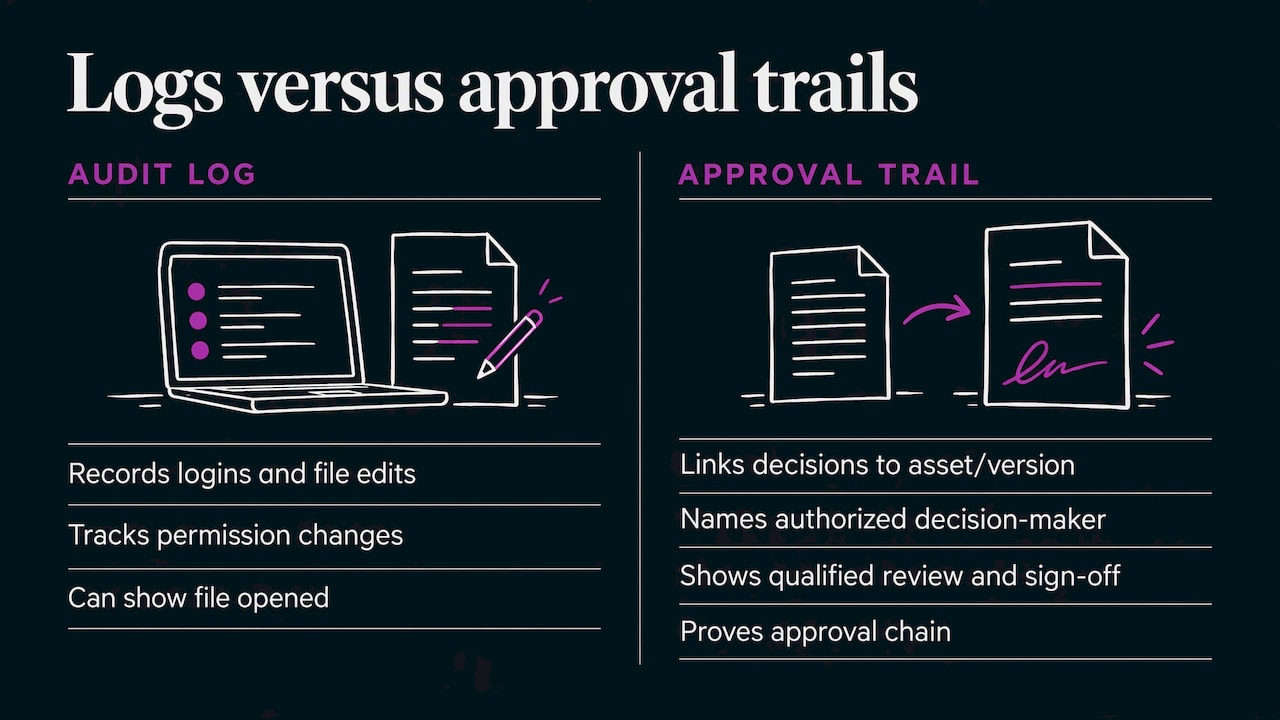
A general audit log records system events: someone logged in, a file was edited, a permission changed. An approval audit trail is narrower and more useful for decisions. It ties each decision to the exact asset or version that was reviewed and to the person who had the authority to decide. A log can show that someone opened a file. A trail shows that a qualified approver reviewed the correct version and signed off.
In practice you want both. The approval trail proves the chain of approval. The wider log proves nothing was altered around it.
The compliance angle
People also search for a “compliance audit trail”, and it is the same idea seen from the auditor’s side. The question is not only “was this approved?” but “can you prove who approved it, under what authority, and that the approved version is the one that ran?” A compliance-grade trail connects three things:
- The workflow record: the path the item took, including skipped, reassigned or escalated steps.
- The version record: the exact asset, document or offer that was reviewed.
- The system record: who was logged in, what rules applied and which integrations touched the item.
If any one of the three is missing, an auditor can usually establish only part of the story: who acted, or what was reviewed, but not both.
Is an approval audit trail mandatory?
There is no single US law that says every business must keep one for every approval. The obligation depends on your industry and the kind of record.
The clearest example is FDA-regulated work. Under 21 CFR 11.10(e), systems that create, modify or maintain electronic records must use secure, computer-generated, time-stamped audit trails to independently record the date and time of entries and actions that create, modify or delete records. Changes must not obscure previously recorded information, and the audit trail documentation must be kept at least as long as the underlying records and be available for agency review and copying.
That rule is a useful template even if you are not in life sciences. It describes four properties any trail should have:
- Computer-generated: the system writes the entry, not a person typing it afterward.
- Time-stamped: each action carries its own date and time.
- Non-obscuring: a change adds a new entry and never overwrites the old one.
- Retained and retrievable: the trail lives as long as the record it protects and can be produced on request.
For most marketing teams the requirement comes from somewhere else: a financial services or insurance advertising review, a franchise agreement, a manufacturer’s co-op program, or an internal audit of fund spending. Ask your legal or compliance team which rules apply to your category and how long records must be kept. Where a rule applies, keep the trail for the retention period that rule sets.
What to record at each approval step
The sources on this topic list slightly different fields, but they converge on the same core. For a marketing approval, capture these:
| Field | What it should hold | Why an auditor cares |
|---|---|---|
| Request ID | A stable identifier for the item and its submission | Lets you pull the whole story with one reference |
| Subject and version | The asset or offer name plus a version number or file reference | Proves what was actually reviewed |
| Requester | Who submitted it, their role and location | Shows the origin, such as which dealer or branch |
| Approver and authority | Named individual, role and the rule that gave them sign-off power | Shows the right person decided |
| Delegation | Who delegated to whom, when and why | Covers vacations and escalations |
| Action and outcome | Approved, rejected, returned or conditionally approved | The decision itself |
| Reason and comments | Why, including required changes | Preserves context a status field loses |
| Timestamp | Date and time with time zone | Establishes sequence and timeliness |
| Evidence | Links to the disclaimer, legal text, claim support or brand guideline relied on | Shows what the decision rested on |
| Exceptions | Skipped stages, overrides, late approvals | The first thing an auditor looks for |
| Next state | Published, revised, archived, funded | Connects approval to what happened afterward |
Two details matter more than they look. First, store the version, not just the file name. “Spring-offer-final.pdf” can mean five different files. Second, log rejections and returns with the same care as approvals. A trail that shows only the successful pass looks curated, and the revisions are often what prove your review actually worked.
An example: one dealer ad from request to run
Here is what a complete trail looks like for a single localized ad in a channel program. The names are illustrative.
- Request. A dealer in Ohio selects a corporate-approved template and customizes the headline and local offer. The system records the request ID, the dealer, the template version and the customized version.
- Local review. The regional marketing manager returns it with a comment that the price is not allowed in this program. The return, the comment and the time are logged.
- Resubmission. The dealer uploads a corrected version. It becomes version 2 and version 1 stays in the record.
- Compliance review. A brand compliance reviewer confirms the required disclaimer is present and approves. The record shows the reviewer’s role and the checklist or guideline applied.
- Funding check. If co-op funds will pay for the ad, the fund approval is recorded against the same request, so the spend and the creative are linked.
- Release. The approved version is published or ordered for fulfillment, and the record shows exactly which version went out.
Six months later, a question arrives: why did this dealer run that offer, and who allowed it? Everything is in one thread. Compare that to reconstructing the same story from an inbox, a shared folder and a spreadsheet.
Where approval trails break down
Most failures are structural rather than technical.
- Approvals happen off-system. A reviewer replies “looks good” in a chat message. The decision was real, but the evidence sits outside the record.
- Files get replaced. A dealer swaps a corrected file into a folder with the same name. The reviewed version no longer exists.
- Authority is unclear. The trail shows a name but not whether that person was allowed to approve this kind of item or amount.
- Delegation is invisible. Someone approves on behalf of a manager who was out, and nothing records the handover.
- Fund approvals live apart from creative approvals. Finance can show a payment, marketing can show an ad, and nobody can show they belong together.
- Retention is an afterthought. The trail exists, but it can’t be exported or has been purged before the retention period ends.
If you run a program with dozens or thousands of local partners, each of these multiplies. The fix is not more discipline from every partner. It is moving the approval itself into a system where the record is created automatically.
Building a trail that stands up to an audit
Map who can approve what
Before tooling, write down approval tiers: which items a local partner can self-approve, which need regional review, which need legal or compliance, and which need finance because money is involved. This is an approval hierarchy, and it is what lets a trail show not just who clicked, but that they were entitled to. Our guide to approval workflow software for distributed marketing teams walks through how those tiers work across partner networks.

Tie every approval to a locked version
An approval is only meaningful against a specific version. Use a system where uploading a change creates a new version instead of replacing the old one, and where the approval references that version. A brand asset audit is a good way to find out how many unreviewed or duplicate files already circulate in your network before you start.
Keep requests, reviews and funds in one place
The strongest trails link creative approval, budget approval and publication. When these live in separate tools, someone has to stitch the story together at audit time. For brands that reimburse partners, the same applies to claims: the proof of performance, the approval and the payout should share a record. See how this works in co-op fund management.
Require reasons for rejections and exceptions
Make comments mandatory when a reviewer rejects, overrides or skips a step. A short reason now is worth hours of guesswork later. Review exceptions on a schedule, for example monthly, so patterns such as repeated late approvals or one partner bypassing review show up before an auditor finds them.
Test retrieval, not just capture
Pick five completed campaigns at random and try to reproduce each approval history in minutes, including who approved, which version and the rationale. If it takes a day of digging, the trail exists but does not serve you. Our overview of a marketing compliance tool for distributed brands covers what to expect from the review layer, and the guide to compliance marketing for distributed teams covers how to run the program around it.
How the trail improves campaigns, not just audits
The trail is evidence, but it is also operational data. Once approvals are recorded consistently you can see things that are invisible otherwise:
- Where campaigns stall. Measure time spent at each stage. If compliance review averages four days, you know where to add reviewers or clearer templates.
- Which partners need help. A partner whose submissions are returned often may need better templates or training, not more policing.
- Which rules cause friction. Frequent rejections for the same reason point to a guideline that is unclear or buried.
- Faster, calmer launches. When reviewers see the full history in one place, they stop asking the same questions twice.
- Cleaner funding decisions. When each ad is linked to its approval and its spend, reconciling co-op or MDF claims becomes a lookup.
For local partners, a clear trail also protects them. If a question comes up later, they can show that the work was reviewed and approved under the program’s rules.
Our perspective
We have spent more than 20 years helping brands that sell through dealers, distributors, franchisees, agents and advisors, and the pattern is consistent. Corporate wants control of the brand and the budget. Local partners want to move fast. The two goals collide when approvals live in inboxes.
Our view is that an audit trail should not be a separate project that someone assembles before an audit. It should be what happens naturally when campaigns, assets, vendors, orders and co-op dollars all run through one login with approval hierarchies behind them. When the work happens in one place, the record is already there.
That is how we designed GearBox®: one platform for the whole marketing logistics chain, so the people who approve, the people who execute and the people who pay are looking at the same item and the same history.
Client
Putting approvals and the record in one platform
GearBox® is our marketing logistics platform for brands that go to market through other people. It brings campaigns, vendors, co-op dollars, orders and brand assets behind one login, with approval hierarchies, campaign calendars and analytics, so corporate keeps control while each local partner gets what it needs to market and sell. It integrates with Adobe DAM and Widen for asset management, and it supports multilingual and multicurrency programs. Brands such as Steelcase, running 15,000+ users in 9 countries, and Applebee’s, automating menus across nearly 2,000 locations, use it at that scale.

If your approvals currently run through email and shared folders, schedule a demo of GearBox® and see how approval hierarchies, assets and funds work together in a single program.
FAQ
What does an approval audit trail check for?
It lets a reviewer verify that the right person approved the right version at the right time, and that required steps were not skipped. Auditors usually look at exceptions first: overrides, late approvals, delegated sign-offs and changes made after approval.
What is an example of an approval audit trail?
A localized dealer ad is a good one. The trail shows the dealer’s request, a regional manager’s rejection with a comment, a corrected second version, a compliance reviewer’s approval with a timestamp, the linked co-op fund approval and the version that was finally published. Each entry names who acted and when.
How is an approval audit trail different from an audit log?
An audit log records system events such as logins and file edits. An approval audit trail records decisions and ties each one to the exact version reviewed and the authority of the approver. Compliance work usually needs both, so you can prove the chain of approval and the integrity of the system around it.
Is an approval audit trail mandatory?
It depends on your industry and the record. FDA-regulated systems, for example, must keep secure, time-stamped audit trails under 21 CFR 11.10(e). Other obligations come from advertising review rules, franchise or co-op program terms and internal controls, so confirm requirements and retention periods with your compliance or legal team.
How long should an approval audit trail be kept?
As long as the record it supports must be kept. Where a regulation sets a retention period, the trail must be retained for at least that long and be available for review. Where none applies, match the retention period for the related campaign, contract or fund records.
