


A campaign calendar works when everyone who touches a campaign, from corporate marketing to the dealer, franchisee or distributor who runs it locally, plans against the same dates, budgets and approvals. A spreadsheet that only the central team opens does not do that. A shared calendar tied to assets, funds and approvals does. This guide covers what to put in the calendar, how to plan the year, and how to keep it accurate once dozens or thousands of partners are involved.
TL;DR
- A campaign calendar is the single view of what launches when, on which channel, for which audience, with which owner and budget.
- Plan the year in layers: annual themes and goals, quarterly campaigns, monthly briefs, weekly production.
- Work backward from launch dates to set draft, review and approval deadlines, and keep a reserve of budget for opportunities you cannot predict.
- In a channel network, the calendar has to connect to assets, co-op and MDF funds, vendors and approvals, or partners will plan around it instead of with it.
- GearBox® from IRIS includes campaign calendars alongside the other pieces a channel program needs, behind one login.
Table of Contents
- What a campaign calendar is and why teams need one
- What a marketing calendar should include
- How to plan the year, step by step
- Calendar views and templates that help
- Managing the calendar across marketing, vendors, partners and sales
- Choosing campaign calendar software
- How we approach it at IRIS
- Promo: See your calendar connected to the work
- Our perspective: the calendar is a control point
- FAQ
- Sources
What a campaign calendar is and why teams need one
A campaign calendar is a dated plan of every marketing activity: what it is, when it runs, where it runs and who owns it. The main benefit, according to Omnisend’s marketing calendar guide, is a centralized view of all marketing activity without juggling multiple tools or spreadsheets, which makes coordination between teams easier and performance tracking simpler.
That benefit is bigger for brands that sell through other people. A single-location company coordinates a handful of people. A brand with dealers, distributors, franchisees, agents or advisors coordinates its own marketers, outside vendors, and every local partner who wants to run a promotion, order materials or spend co-op dollars. Without a shared calendar, three things tend to happen:
- Collisions. Corporate launches a national promotion the same week a regional partner runs a competing offer. Pipedrive’s guide notes that a calendar helps teams spot conflicts such as three campaigns launching in the same week before they happen.
- Unclear ownership. Nobody knows who approves the creative, who orders the print run, or who confirms the offer is live.
- Missed money. Funds earmarked for a campaign go unused because partners learn about the program too late to plan around it.
What a marketing calendar should include
The question comes up in almost every search for a template, and the answer is shorter than most templates suggest. Every entry needs enough information that someone who was not in the planning meeting can act on it.
Per entry:
- Campaign name and objective. One sentence on the goal, such as generating leads, driving store traffic or launching a product line.
- Dates. Start, end, and the internal deadlines before launch.
- Audience. Who it targets, and which partners or regions participate.
- Channels. Email, social, print, paid media, in-store, events, direct mail.
- Owner. One named person accountable, plus the approver.
- Budget and funding source. Corporate budget, co-op funds, market development funds (MDF, money a brand sets aside to help partners market its products) or partner contribution.
- Assets. Which creative, copy and landing pages belong to the campaign, and where the approved versions live.
- Status. Draft, in review, approved, live, closed.
Typical ecommerce calendars, according to Omnisend, carry campaign names, dates, channels, audience segments and goals. For channel programs, add the last three items on the list above. Funding source, assets and status are where indirect-channel calendars usually break down.
Layer in the dates that shape demand in your category: holidays, trade shows, product launches, fiscal quarter ends, program deadlines for co-op claims, and seasonal peaks. AM World Group recommends a master list of company, industry and cultural dates as the base of an annual calendar.
How to plan the year, step by step
The steps below turn a blank calendar into a working plan. They suit a corporate team planning for a network of partners.
Step 1: Start with last year’s results
Before adding anything, look at what ran last year and what it produced. Which campaigns drove sales through which partners? Which funds went unused? Which launches missed because assets arrived late? AM World Group advises analyzing past performance first, and in a channel program that means looking at partner-level participation, not just totals. A campaign with strong results from 10 percent of partners has a participation problem, not a creative problem.
Step 2: Choose a few big bets and say what you will not do
A calendar with 40 priorities has none. The Marketing Operating System Blueprint suggests building the year on one to three big bets and listing what the team is deliberately not doing. Write them down at the top of the plan. When a partner or a sales leader asks for a one-off push in March, you have a reference for the answer.
Step 3: Plan in four horizons
Separate the planning into layers, as in this four-horizon editorial model:
| Horizon | What gets decided | Who needs to see it |
|---|---|---|
| Annual | Business goals, themes, revenue targets, key dates | Leadership, sales, partner managers |
| Quarterly | Campaigns, offers, funding allocations | Marketing, vendors, partner managers |
| Monthly | Detailed briefs, channel allocation, asset needs | Marketing, vendors, partners |
| Weekly | Production, approvals, launches | Everyone executing |
Partners need the annual and quarterly layers early, so they can plan budgets and staffing. They need the monthly and weekly layers in enough detail to execute.
Step 4: Build the master list of dates and sort campaigns by type
Place fixed dates first: product launches, seasonal peaks, trade shows, program deadlines. Then sort campaigns by purpose, such as awareness, lead generation, retention, launches and brand building, and spread them across the year so no one quarter carries everything. A calendar skewed toward the fourth quarter overloads your creative team and your partners at the same moment. For seasonal businesses, our guide to seasonal retail campaign planning covers the planning mistakes that cost the most.
Step 5: Work backward from launch dates
For each campaign, set the launch date, then count backward. Pipedrive recommends breaking larger campaigns into smaller tasks and working backward from send dates to set draft, review and approval deadlines. In a channel program, add the steps that only exist because partners are involved: when partners must opt in, when they must order materials, and when printed pieces must ship so they land before the campaign starts. Lead times for approvals multiply when each local partner has to personalize and sign off on creative.

Step 6: Reserve money and room for the unplanned
A full calendar is a fragile one. AM World Group suggests reserving 10 to 15 percent of budget for emerging opportunities, and keeping a backlog of evergreen content that can be activated when capacity frees up. Decide in advance what qualifies to bump a planned activity so the answer does not depend on who shouts loudest.
Step 7: Set review rhythms
The plan is only useful if it stays current. The Blueprint pairs the annual plan with short weekly syncs, monthly business reviews and quarterly planning sessions. AM World Group likewise recommends quarterly reviews so the calendar remains a living document. Hold the quarterly review with partner managers in the room, since they know which programs partners are actually using.
Calendar views and templates that help
Templates are a fine starting point for a single team. A few views cover most needs:
- Monthly grid. Best for spotting collisions and gaps at a glance.
- Timeline (Gantt style). Best for campaigns with long lead times, where print, approvals and fulfillment overlap.
- Channel view. Filters the same calendar by email, social, print or events, so channel owners see only their slice.
- Partner or region view. Shows each dealer, franchisee or office what is running in their market and what is open to them.
- Funding view. Shows which campaigns draw on which budget or co-op pool.
If you want examples of how a year-round calendar balances campaigns against key dates, these content calendar examples show several layouts you can borrow for the structure.
The limit of any template is that it is a document. It does not know whether the creative is approved, whether a partner has ordered materials, or whether the co-op claim was filed. At a few campaigns a quarter that is manageable. At network scale, the calendar needs to be connected to the work.
Managing the calendar across marketing, vendors, partners and sales
The hard part of campaign calendar management in an indirect channel is not building the plan. It is keeping four groups working from it.
Corporate marketing owns the plan, the brand standards and the budget. It needs to see what is scheduled, what is approved and what funds have been committed.
Vendors (agencies, printers, fulfillment houses, media buyers) need dates, specifications and approved assets, and they need them in one place rather than scattered across email threads. Our vendor management guide for channel networks goes deeper on keeping that side organized.
Channel partners need to know what is available, when it runs, what it costs them and how to take part. Their time for marketing is limited, so a calendar that asks them to read a 40-page program guide loses them. A good one tells a partner in a few clicks what they can run this month and how to launch it. For more on the structure behind this, see our piece on marketing team workflow for multi-location and field campaigns.
Sales teams need to know what promotions are running so they can use them in conversations, and they need real-time insight into what is working so they can tell corporate what partners are asking for.
Four practices keep these groups aligned:
- Standardize intake. Use one request form with the same fields every time, and publish the criteria for prioritizing requests. Otherwise the calendar fills with whoever asked loudest.
- Lock the dates once aligned. After planning, freeze launch and asset deadlines so vendors and partners can commit resources. Changes then go through a deliberate process.
- Define approvals once. Decide who approves what, by campaign type and partner tier, and write it down. A clear approval workflow for distributed teams prevents the bottleneck where everything waits on one person.
- Tie money to the calendar. Every campaign should show where its funding comes from, and every co-op or MDF claim should link back to a calendar entry. Our co-op fund management guide explains how to automate tracking and measure return.
Choosing campaign calendar software
Simple calendar tools are enough for a small team on one campaign at a time. When the calendar must serve many partners, the evaluation criteria change. Judge software against these:
| Criterion | What to ask |
|---|---|
| Partner access | Can each partner see and act on their own view, with their own login? |
| Approvals | Can you set approval hierarchies by campaign type, region or partner tier? |
| Assets | Does it connect to your digital asset management system, so the calendar points to the current approved creative? |
| Funds | Does it track co-op and MDF allocations, claims and utilization against campaigns? |
| Ordering and fulfillment | Can partners order printed or branded materials from the same place? |
| Reporting | Can corporate and sales see participation and results by partner, region and campaign? |
| Scale | Does it handle multiple languages, currencies and countries if you operate in them? |
| Cost | Is pricing by module or user, and what does implementation involve? |
A tool that does only scheduling leaves you stitching assets, funds, orders and approvals together by hand, which is how spreadsheets creep back in.
How we approach it at IRIS
GearBox® is our marketing logistics platform for brands that sell and market through dealers, distributors, franchisees, agents and advisors. It puts campaigns, vendors, co-op dollars, orders and brand assets behind one login, so corporate keeps control of the brand and the budget while every local partner gets what they need to market and sell. Campaign calendars are one of its modules, alongside asset management that integrates with Adobe DAM and Widen, co-op and MDF fund management, approval hierarchies, order tracking, analytics and collateral fulfillment. It supports multilingual and multicurrency programs.
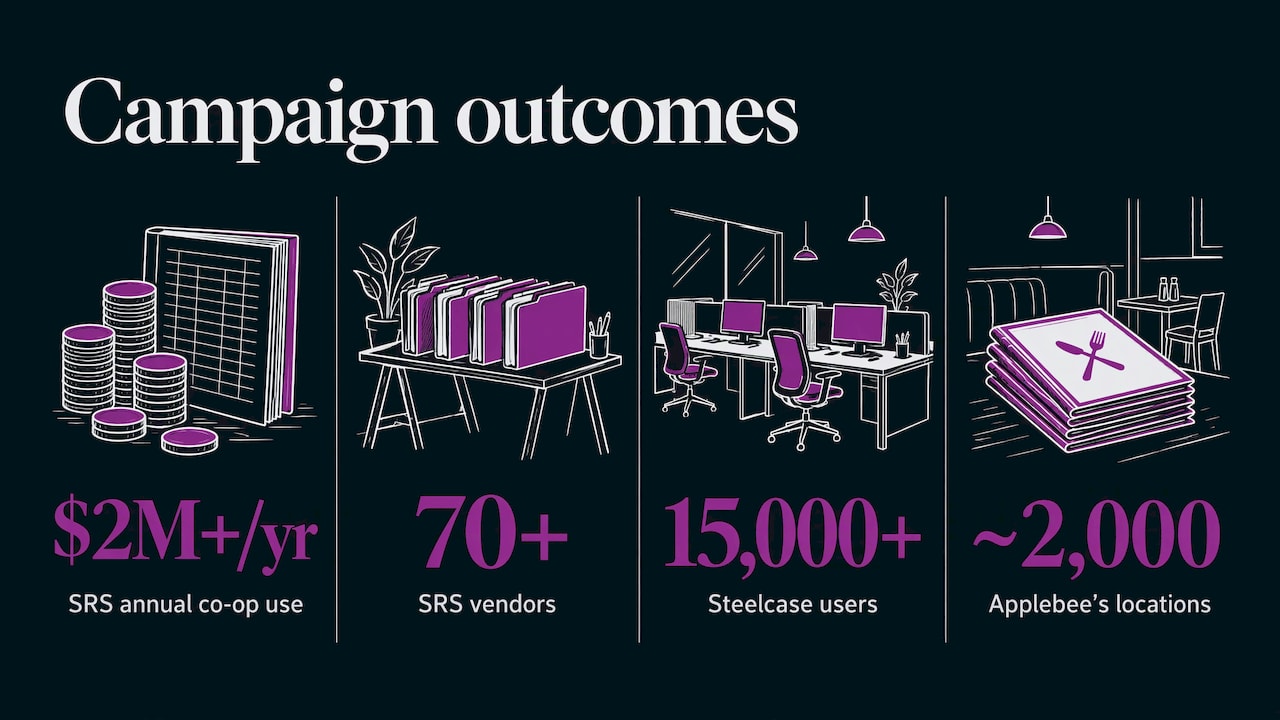
The results come from this connected approach. SRS Distribution added more than $2 million a year in co-op fund use across 70+ vendors, Steelcase runs 15,000+ users in 9 countries, and Applebee’s automates menus across nearly 2,000 locations.
Promo: See your calendar connected to the work
If your calendar lives in a spreadsheet while assets, approvals and co-op claims live somewhere else, GearBox® brings them together. Campaign calendars, funds, vendors, orders and brand assets sit behind one login for your team and your partners. To see it with your own program in mind, schedule a demo of GearBox®.

For a deeper look at how it applies in your industry, see how we work with manufacturers, multi-location restaurants and insurance organizations.
Our perspective: the calendar is a control point
Most calendar advice is written for one marketing team. Ours is written from more than 20 years of working with brands whose marketing happens in other people’s hands.
In that setting, the calendar is not a scheduling aid. It is where brand control and local freedom meet. If the calendar is open to partners but disconnected from approvals, the brand loses control. If it is locked down and disconnected from what partners need, they work around it.
That is why we build campaign calendars inside GearBox® next to asset management, co-op and MDF fund management, vendor procurement and order tracking. A date on a calendar means something when the creative behind it is approved, the funds behind it are allocated and the materials behind it can be ordered by the partner who will run it.
Our advice to marketing leaders is to plan fewer campaigns, plan them earlier and give partners one place to see what is open to them. The calendar then becomes the thing partners check first, rather than the thing corporate maintains alone.
Client
FAQ
What is the difference between a marketing calendar and a campaign calendar?
A marketing calendar usually covers all marketing activity, including content, social posts and events. A campaign calendar focuses on the coordinated efforts with a start, an end and a goal. Many teams keep one master calendar and filter it by campaign.
How far ahead should we plan an annual marketing calendar?
Fix the annual themes, key dates and major launches at the start of the year, and detail the next quarter. Revisit quarterly so the plan reflects what the market and your partners are doing. Brands with print or fulfillment lead times should plan those campaigns further out than digital ones.
Who should own the campaign calendar?
One team should own it, usually corporate marketing or marketing operations, with named owners for each campaign. Partners and vendors contribute and consume, but a single owner keeps dates, priorities and approvals consistent.
Can a spreadsheet template work for a channel program?
A template is a good way to define the fields and views you need. As the number of partners, vendors and funding sources grows, connecting the calendar to assets, approvals and funds in one platform keeps it current without manual updating.
Sources
- 2026 Marketing Calendar Template: Key Dates (Omnisend)
- Marketing Operating System Blueprint (E.R.M. Advisory)
- Create an Annual Marketing Calendar (AMW)
- How to create a marketing calendar in 2026 (Pipedrive)
- Content Calendar Strategy: 2026 Editorial Framework (Plang Phalla)
- 7 Content Calendar Examples For Startups (Lizard’s Lunch)
