



A creative approval workflow is the fixed path an asset follows from request to sign-off: who reviews it, in what order, against what standard, and who has the final word. The ones that work have a single binding approver per asset, a short checklist for each gate, a time limit for each review, and one place where versions and decisions live. If your brand sells through dealers, franchisees, distributors or agents, the same workflow also has to let local partners adapt artwork without waiting in a queue. That is the case we make here, and it is why we build GearBox® around approval hierarchies instead of email threads.
TL;DR
- Creative approval workflow and creative approval process mean the same thing in practice: the steps, roles and rules that take an asset from brief to sign-off.
- Name one approver per asset. Everyone else is a reviewer whose comments are advisory, so conflicting feedback gets decided once, in writing.
- Give each gate a time limit, and review a short checklist rather than a blank canvas.
- Track revision rounds, approval time and on-time delivery. Those three show quickly whether the process is improving.
- For channel programs, route local edits through templates and approval tiers so corporate controls the brand and partners still move fast.
Table of Contents
- What a creative approval workflow is, and how it differs from the process
- The artwork approval process, step by step
- Designing the workflow: roles and decision rights
- How long should creative approval take?
- Collaboration across marketing, vendors, partners and sales
- Tracking versions, comments and status
- Measuring whether the process is improving
- Perspective: approval is where brand control and local speed meet
- Bring approvals, assets and orders into one place
- FAQ
- Sources
What a creative approval workflow is, and how it differs from the process
People use “workflow”, “process” and “artwork approval process” interchangeably, and for most teams that is fine. If you want a distinction, the process is the policy (what must be true before an asset goes live) and the workflow is the routing (who gets the asset next, and what happens on approve, reject or no response).
The same logic applies to a marketing approval workflow. Creative approval covers the look and message of the asset. Marketing approval adds the checks around it: legal and compliance language, budget, offer terms, channel and timing. In a brand with a dealer or franchise network, a third layer appears: whether a local partner’s version still matches corporate standards.
That third layer has a legal side in the US. Under the Lanham Act, a trademark owner that licenses its mark and does not control the quality of what is sold under it risks what courts call “naked licensing”, which can weaken the mark itself. For franchisors in particular, a documented approval step for local marketing is part of showing that control. Your legal counsel should confirm what that means for your agreements, but the practical point stands: approvals are brand protection, not just housekeeping.
The artwork approval process, step by step
This is the sequence that works for a campaign asset such as a flyer, ad, in-store graphic or social post. Each step lists what it takes and where it usually goes wrong.
1. Submit a complete request
The request states the goal, audience, channel, size and format, mandatory copy, deadline and the named approver. Most delays start here: a thin brief produces a first draft that misses, and the miss is discovered at the approval gate, not at the start.
In a channel program, the request often comes from a local partner, not a creative team. Give them a form with only the fields that matter, and let them start from an approved template so the first draft is already on brand. In GearBox, campaigns, assets, vendors and orders sit behind one login, so the request, the asset library and the vendor doing the work are connected from the first click.
2. Run a pre-review check
Before any stakeholder sees the file, someone checks the mechanics: correct logo version, required legal lines, image resolution, spelling, the right size. This is a quality-assurance gate, and it should take hours, not days. It keeps senior reviewers from spending their time on typos.
3. Route to reviewers in the right order
Decide whether reviewers go in parallel or in sequence. Parallel review is faster and suits independent checks such as brand, legal and product. Sequential review suits dependent ones, for example regional approval before corporate. Either way, every reviewer should know what they are reviewing for. A legal reviewer who comments on color is a symptom of a routing problem.
4. Consolidate feedback
One person, usually the project owner, merges comments into a single list and flags conflicts. Comments pinned to the exact spot on the asset beat a paragraph in an email, because nobody has to guess which headline “the second one” meant.
5. Revise and resubmit with a change note
The designer returns a new version with a short note on what changed and what was deliberately not changed, and why. Reviewers then check only the delta. Without this, every round turns into a full re-review.
6. Final sign-off and lock
The named approver records the decision. The approved file is locked, labeled as final and moved to the library where partners can find it. The old versions stay archived but out of reach, so nobody prints last month’s offer.
7. Release and record
The asset goes to print, media or the partner’s channels, and the decision trail is stored: who approved, when, which version. If a question comes up months later, you can answer it in minutes.
Designing the workflow: roles and decision rights
Feedback chaos is almost always a decision-rights problem, not a tool problem. Four roles cover most workflows:
| Role | What they do | Typical owner |
|---|---|---|
| Requester | Submits the brief and answers questions | Marketer, local partner, sales rep |
| Creator | Produces and revises the asset | Designer, agency, vendor |
| Reviewer | Checks the asset against one criterion | Legal, brand, product, regional lead |
| Approver | Makes the binding decision | One named person per asset |
A RACI matrix (Responsible, Accountable, Consulted, Informed) is the standard way to write this down. A campaign approval RACI example advises assigning exactly one accountable person to each row who owns the final result, and settling that before deciding who does the work. That single owner is what ends the argument when two stakeholders disagree.
Creative Project Management recommends the same thing in practice: name the one person whose feedback is binding at kickoff, confirm it in writing, and when stakeholders contradict each other, send the conflict back to that approver as a decision to make in writing. It is a small habit that removes a whole category of extra rounds.
Set tiers by risk, not by habit
Not every asset needs the same scrutiny. A practical split:
- Pre-approved, no review: edits inside a locked template, such as swapping a local address, phone number or a dealer’s photo.
- Light review: a local partner’s custom copy or a new layout built from approved elements. One reviewer, short time limit.
- Full review: new campaigns, regulated claims, anything with pricing, financing or guarantees. Brand, legal and the accountable approver.
This tiering is where distributed marketing programs gain or lose most of their speed. When every local request goes through full review, corporate becomes the bottleneck and partners go around the system. When most requests fall in the first two tiers, corporate reviews the few things that carry real risk. Our guide to approval workflow software for distributed teams goes deeper on how to structure those tiers across a partner network.
How long should creative approval take?
There is no universal number, but there is a pattern: set a time limit per gate and treat silence as a signal. One published two-gate example for ad campaigns uses a 24-hour limit for creative quality assurance and 48 hours for pre-launch campaign review. Treat those as a starting point, not a standard. Your own limits should reflect how long a real check takes for your assets.
A few rules make time limits stick:
- Automatic reminders at half the time limit, and escalation to the approver’s manager or a delegate at the limit.
- A named backup for every reviewer, so vacations do not stall a launch.
- Batched submission for recurring work, such as monthly local campaigns, so reviewers can plan a block of time.
- Context in the request, because a reviewer who must hunt for the brief takes longer and reviews worse.
If reviews run long even with these in place, look at volume. Too many assets arriving at the gate at once is usually the cause, and the fix is tiering and templates, not more pressure on reviewers.
Collaboration across marketing, vendors, partners and sales
Inside a single team, an approval workflow connects a few people who sit near each other. In a channel program it connects hundreds of dealers, agents or franchisees, outside vendors such as printers and agencies, and sales teams who need finished materials now.
What breaks at that scale is visibility. A local partner does not know whether their request is stuck at brand, legal or a vendor. A salesperson cannot tell whether the brochure for tomorrow’s meeting is approved. Corporate cannot see which versions are circulating.
Three practices fix this:
- One shared status for every asset. Requested, in review, changes requested, approved, in production, delivered. Everyone sees the same status without asking.
- One library of approved assets. Partners pull from it instead of emailing for the latest file. GearBox’s asset management module integrates with Adobe DAM and Widen, so teams that already store brand files there keep them, and our Digital Asset Manager overview shows how that library works.
- Approval connected to what happens next. An approved asset that cannot be ordered, funded or fulfilled in the same place still creates handoffs. Linking approval to ordering, vendor selection and, where relevant, co-op funds closes the loop. For brands that reimburse local advertising, co-op fund management depends on approved creative, because claims usually need proof that the ad met brand standards.
For a wider view of how these pieces fit, see our guide to the marketing workflow process and the walkthrough of a marketing team workflow for multi-location campaigns.
Tracking versions, comments and status
The features that matter in any approval setup, whether it is a tool or a disciplined shared folder, are a short list:
| Need | What good looks like |
|---|---|
| Version control | Every version numbered, one marked final, older ones archived |
| Comments | Pinned to the spot on the asset, attributed, resolved or open |
| Status | A single visible state per asset, updated automatically |
| Decision record | Who approved, when, which version, with reasons for rejections |
| Permissions | Partners can adapt only what the template allows |
| Reuse | Approved assets findable by campaign, region and product |
The most common failure is not missing features but split locations: comments in email, files in chat, approvals in a spreadsheet. Pick one home for the asset and its decisions. When that home is the same platform that holds your campaigns, vendors and orders, the audit trail is a by-product of the work rather than a separate chore.
Measuring whether the process is improving
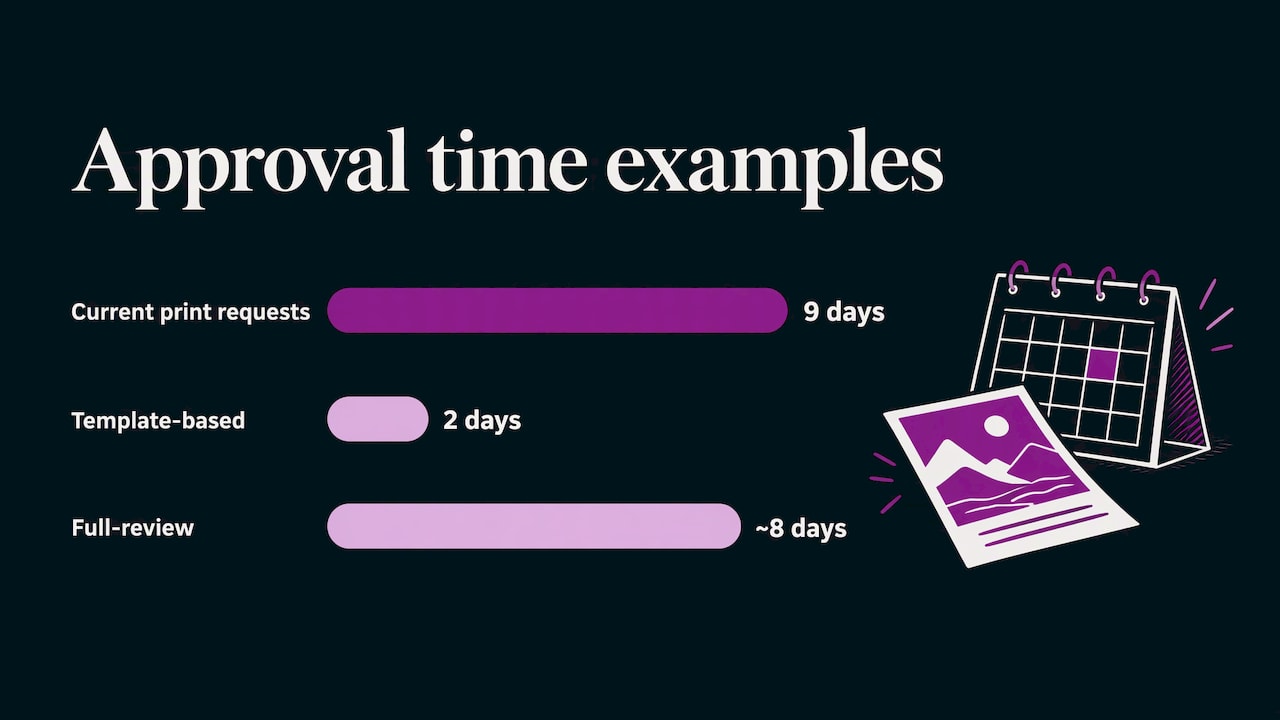
Track a few numbers before you change anything, then again after. Creative operations guidance from New Engen lists approval time, number of revision rounds, on-time delivery rate, time from brief to launch and cost per asset among the efficiency measures, and groups them under speed, capacity and quality.
For an approval workflow, start with three:
- Approval time: hours or days from submission to sign-off, by tier.
- Revision rounds: average rounds per asset. One round is normal. Consistently three or more points to unclear briefs or late feedback.
- On-time delivery: share of assets approved before the date the requester needed.
A worked example: say local print requests currently take 9 days from submission to approval with 3.2 rounds on average. You introduce locked templates and a light-review tier, and a month later the template-based requests clear in 2 days with 1.1 rounds, while full-review assets stay near 8 days. The blended number improves, but the tier split tells you where the next gain is. Always report by tier, or the average hides what is happening.
To see how approval speed connects to results in the field, read how to track local campaign ROI and the campaign performance report guide.
Perspective: approval is where brand control and local speed meet
We have spent more than 20 years working with brands that sell through other people, and the pattern is consistent. Corporate wants control of the brand and the budget. Local partners want to get a campaign out this week. Most approval problems come from treating those as opposing goals.
They are not. When the template is approved, the local edit inside it does not need review. When the approver is named, the conflicting comments stop. When the asset, the vendor, the order and the fund claim live in one place, nobody asks where the file is.
That is the thinking behind GearBox. Every campaign, vendor, co-op dollar, order and brand asset sits behind one login, with approval hierarchies that put corporate review where it matters and give partners a clear path everywhere else. Steelcase runs more than 15,000 users in 9 countries on it, and Applebee’s automates menus across nearly 2,000 locations. The scale is different for each brand, but the principle is the same: design the approval path first, and speed follows.
Client
Bring approvals, assets and orders into one place
If your approvals live across email, shared drives and spreadsheets, the fastest improvement is to put the workflow where the campaign already runs. GearBox® is our modular marketing logistics platform for brands that market through dealers, distributors, franchisees, agents and advisors. It combines asset management, approval hierarchies, Converge® for global-to-local marketing, vendor-agnostic procurement, order tracking and co-op and MDF fund management, with multilingual and multicurrency support.

See how the approval path would work for your network: schedule a demo of GearBox, or read how global-to-local marketing lets corporate set the guardrails while local teams adapt.
FAQ
What is the difference between a creative approval workflow and a creative approval process?
The process is the set of rules: what is reviewed, against which standards and by whom. The workflow is how an asset moves through those rules: routing, notifications, deadlines and decisions. Most teams document both together.
How many reviewers should an asset have?
As few as the risk requires. Give each reviewer one criterion, such as brand, legal or product accuracy, and name one approver with the final say. Low-risk edits inside approved templates may need no review at all.
How many revision rounds are normal?
One or two is common for a clear brief. When assets regularly need three or more, look upstream at the brief, the template or the timing of feedback rather than at the designer. Track the average by asset type to see where it happens.
How do we keep local partners on brand without slowing them down?
Give them approved templates with locked brand elements and editable local fields, and route only custom changes to review. Tie approval status to the asset library so partners only use final files. That keeps corporate control and removes most waiting.
Sources
- How franchisors legally enforce brand standards (Reidel Law Firm)
- RACI matrix guide with campaign approval example
- 7 Common Challenges in Creative Project Management
- Team-Based Facebook Ads Management: The Coordination Stack
- What Is Creative Operations? A Guide for Marketing Teams
